 |
KaliVeda
Toolkit for HIC analysis
|
|
KaliVeda
Toolkit for HIC analysis
|
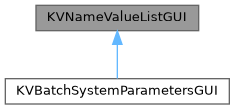
GUI for setting KVNameValueList parameters.
Created by KVClassFactory on Fri Feb 17 09:32:40 2017 Author: John Frankland,,,

This is a lightweight transient dialog box which can be used to set an arbitrary list of parameters. The parameters are contained in a KVNameValueList. To use, do:
[Note that this example is for stand-alone use of the GUI. The first argument to the constructor is usually the TGMainFrame of your GUI application]
If the user presses 'Cancel', the original values of the parameters are restored.
Boolean parameters can be used to 'enable' other parameters in the GUI, i.e. with the previous example, if you do:
then the "Min" and "Max" input widgets in the GUI will only be enabled when the "FixLimits?" parameter is true, and will be en/disabled when the check box for this parameter is checked/unchecked.
Definition at line 55 of file KVNameValueListGUI.h.
#include <KVNameValueListGUI.h>
Public Member Functions | |
| KVNameValueListGUI (const TGWindow *main, KVNameValueList *params, Bool_t *cancel_pressed, Bool_t wait_for_main=kTRUE) | |
| Constructor. More... | |
| virtual | ~KVNameValueListGUI () |
| Destructor. More... | |
| ClassDef (KVNameValueListGUI, 1) void DisplayDialog() | |
| void | CloseWindow () |
| void | DoClose () |
| bool | EnableDependingOnBool (const TString &value_to_enable, const TString &bool_parameter) |
| bool | MutuallyExclusive (const std::vector< TString > &bool_params) |
| void | ReadData () |
| void | RestoreData () |
| return all values to original state More... | |
| KVNameValueListGUI::KVNameValueListGUI | ( | const TGWindow * | main, |
| KVNameValueList * | params, | ||
| Bool_t * | cancel_pressed, | ||
| Bool_t | wait_for_main = kTRUE |
||
| ) |
Constructor.
Definition at line 138 of file KVNameValueListGUI.cpp.
|
virtual |
Destructor.
Definition at line 213 of file KVNameValueListGUI.cpp.
| KVNameValueListGUI::ClassDef | ( | KVNameValueListGUI | , |
| 1 | |||
| ) |
| void KVNameValueListGUI::CloseWindow | ( | ) |
Definition at line 237 of file KVNameValueListGUI.cpp.
| void KVNameValueListGUI::DoClose | ( | ) |
Definition at line 227 of file KVNameValueListGUI.cpp.
| bool KVNameValueListGUI::EnableDependingOnBool | ( | const TString & | value_to_enable, |
| const TString & | bool_parameter | ||
| ) |
If the list of parameters contains a boolean variable with name bool_parameter, one or more of the widgets (number entry field, text entry field, etc.) can be disabled or enabled depending on the boolean state.
if bool_parameter is not the name of a boolean in the list, or value_to_enable cannot be found in the list, returns false. otherwise, returns true in case of success.
Definition at line 252 of file KVNameValueListGUI.cpp.
| bool KVNameValueListGUI::MutuallyExclusive | ( | const std::vector< TString > & | bool_params | ) |
Given a list of boolean parameters in the list, this makes them mutually exclusive options (like a radio button group): only one of them can be 'true' at once. As soon as one of the corresponding check boxes is ticked, all the others are unticked (and become 'false').
Definition at line 297 of file KVNameValueListGUI.cpp.
| void KVNameValueListGUI::ReadData | ( | ) |
Definition at line 77 of file KVNameValueListGUI.cpp.
| void KVNameValueListGUI::RestoreData | ( | ) |
return all values to original state
Definition at line 101 of file KVNameValueListGUI.cpp.
 1.9.1
1.9.1